Join me on my adventure switching our company from NetSuite to Business Central.
If you are thinking about leaving NetSuite, this may be the blog for you. I will try to detail all of the steps in my decision and implementation of Business Central from NetSuite.
Why leave NetSuite?
- It’s really expensive. It costs about 4 times more to be on NetSuite than on Business Central. When you think about it, it’s ridiculous. The cost of NetSuite is at least one head count. It can be a saved job, freed up resources to work on automation or other initiatives or can just be savings for the finance department as a whole. Either way, the cost of a headcount is material enough for me.
- Why do the fees go up 5% to 10% every year and they “give you savings” on renewal of 2% to 3%? It makes no sense. In fact, it’s insulting. Some “account manager” whose job is to pretend that the cost is going up (for no reason) and then giving you a price break if you renew 90 days before the expiry. I don’t like being insulted and I don’t like being taken advantage of.
- There’s no out of the box ODBC database connection or PowerBI connection. I’m stuck running the reports that NetSuite wants you to run. Sure, I know you can pay for API’s and other connections, but did I mention it costs a headcount? API access is about half a head count. I don’t see why I need to pay for that. What do we currently do? We export the data, run it through some Excel magic, and export to SQL so that PowerBI can do it’s magic. It’s a lot of manual steps for no reason.
Choosing Business Central
There are a lot of choices out there for accounting packages. Why Business Central?
- It’s inclusive with the Office365 world. It plays nicely with Excel (in fact you can do some cool things like copy and paste journal entries from Excel directly into Business Central.
- Out of the box (OOTB) APIs are free and they are pretty effective. These are CRUD APIs (create, delete, edit and read)
- It plays very nicely with PowerBI. PowerBI has access to all of the tables from Business Central. And the tables that aren’t natively available, PowerBI can use the APIs from above.
What’s not great or great about Business Central vs NetSuite?
Not everything is roses with Business Central. It is different from NetSuite in many different ways.
- I usually say, NetSuite was made by a lazy accountant. Very easy to find information, Business Central on the other hand was made by a very logical engineer. So what exactly do I mean by this? In Netsuite, it generally pretty easy to drill down and there are plenty of links to get to the information that you may need. Let’s say you are looking at the income statement and you want to know what numbers make up the revenue line, you simply just click on it and it brings you to that screen. In Business Central, you won’t get any of that. OOTB reports cannot drill down. If you want something more robust, you have to use Jet Reports or PowerBI. You can’t write your own reports without doing in AL (Business Centrals programming language).
- It take a little getting used to. Want to see what is happening to with a vendor? You have to use the vendor ledger. What about the customer? Use the customer ledger. There is a ledger for everything and it’s not sexy, but it does the trick. The ledger is all the debits and credits for each customer/vendor/fixed asset. On the flip side, NetSuite doesn’t have a ledger for everything. NetSuite drill down reports are at the GL level. What if you want to run reports for a specific customer? You have to create the report and then use the clunky interface to create the filters. Business Central filtering is much better than NetSuite on these reports.
- Business central is more traditional in that you have to post everything. Entries are automatically saved, but won’t show up in your GL until you post them. It’s great because when you start to post something, it always saves it. You can come back to it and change it up before you post. In NetSuite, if you start a journal entry, you have to finish it before you close the window or else you lose your spot. Sure, you can save the journal entry, but when you save it, it has to balance, and it is posted immediately. I like Business Central’s approach after using it for a bit.
- Business Central seems faster. Maybe it’s the grid approach (I call it the Excel grid approach to entering information) whereas NetSuite has to many clunky pop ups. Want to look up a customer and then select that customer? NetSuite is a little buggy at times. In Business Central, the search is faster and it’s a little more intuitive when it comes to entering information or data

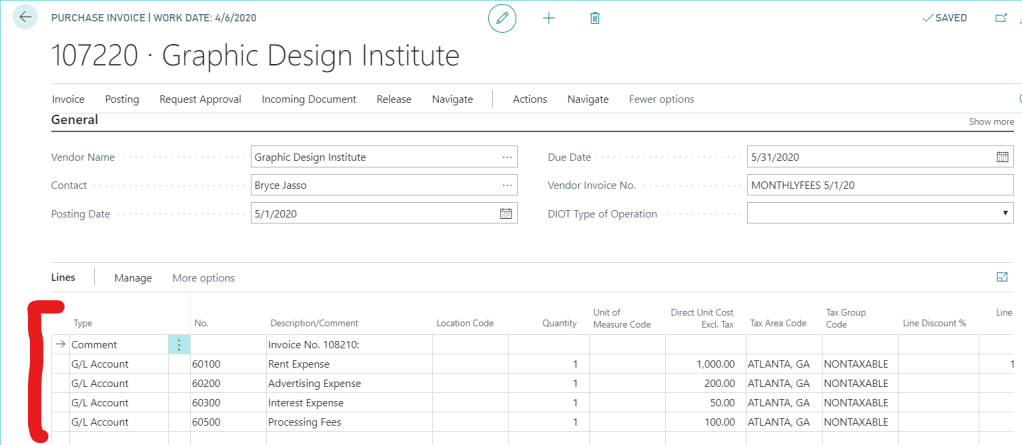
- Business Central has a cool feature where you can cut and paste data directly from Excel into the grid form that you are working with. NetSuite can’t touch that.
- The one thing I don’t like about Business Central… all the error messages if something is not setup correctly. It seems here that NetSuite is a LITTLE bit more intuitive, but it could just be that I am not entirely used to Business Central yet.
- Sales taxes. NetSuite doesn’t understand Canadian sales taxes. Some of our provinces have 2 sales taxes! And NetSuite cannot handle that. It takes so much time to deal with going back over invoices to edit the taxes. I have spent hours on the phone with support to see what we can do to get sales taxes to work properly. On the other hand, Business Central just knows and can handle them properly.
Leave a comment below if you want to know more.
No comments to show.
Pages: 1 2
 DIY Accountant