I wanted a really simply way to access the tables in Business Central and to write the information of those tables into SQL database so that my team could access them directly from SQL.
Since I am just an accountant, I always find it very difficult when I find snippets of code but nothing is explained. So I will try my best to break everything down for other fellow accountants so that they can follow through.
Sure, there are many ways to do this, but I just wanted to try this. So here is my script. You can copy this script directly, and there are just a few things for you to change. Any thing that is underlined you will need to change.
#  References.
#  https://docs.microsoft.com/en-us/azure/active-directory/develop/v1-protocols-oauth-code
#  https://www.reddit.com/r/PowerShell/comments/9clts3/powershell_automation_with_oauth2/
#

#
# https://login.windows.net/2383c526-aef3-47e9-8487-37712e689168/oauth2/token?resource=https://api.businesscentral.dynamics.com

# Class to get an OAuth 2.0 authentication token from BC using a Password Grant.
#
class AADPasswordGrant {
    [string]$token                  #Token that we need to get to Authenticate with later
    [string]$tenantId               #BC Tenant ID
    [string]$clientId               #The ApplicationId that was registed for BC in AAD.
    [string]$username               #BC username
    [string]$password               #BC Password
    [System.Security.SecureString]$securePasswordStr #BC Password we will convert to a secure string later
    [string]$securePasswordBStr     #BSTR version of the secure password
    [string]$clientSecret           #Key that was generated when registring BC in AAD
    [string]$grantType      = "password"  #This must be password so we are not challenged or have to use a form.
    [string]$callbackUrl    = "https://127.0.0.1/auth-response"              #The same callback registered for BC in AAD
    [string]$accessTokenUrl = "https://login.windows.net/{tenantId}/oauth2/token"  #Url to request the token from
    [string]$resourceUrl    = "https://api.businesscentral.dynamics.com"           #The resource we want to talk to
    [string]$scopeUrl       = "https://api.businesscentral.dynamics.com"           #The resource we want to talk to

    AADPasswordGrant([string]$tenandId, [string]$clientId, [string]$clientSecret, [string]$userName, [string]$password) {
        $this.tenantId     = $tenandId
        $this.clientId     = $clientId
        $this.clientSecret = $clientSecret
        $this.userName     = $userName
        $this.securePasswordStr  = (ConvertTo-SecureString -String $password -AsPlainText -Force)
        $this.securePasswordBStr = [System.Runtime.InteropServices.Marshal]::PtrToStringAuto([System.Runtime.InteropServices.Marshal]::SecureStringToBSTR($this.securePasswordStr))
        $this.accessTokenUrl     = $this.accessTokenUrl.Replace('{tenantId}', $tenandId)
    }

    [void]TryGetAuthorisationToken () {
        $body = @{
            grant_type    = $this.grantType
            username      = $this.userName
            password      = $this.securePasswordBStr
            client_id     = $this.clientId
            client_secret = $this.clientSecret
            scope         = $this.scopeUrl
            redirect_uri  = $this.callbackUrl
            resource      = $this.resourceUrl
        }
        $authResult = Invoke-RestMethod -Method Post -Uri $this.accessTokenUrl -Body $body
        $this.token =$authResult.access_token
    }
}

#
# Test the Class Here
#
$tenantId     = '1447d526-aee2-47e9-8418-27732e6848546'      #Your BC tennantID
$clientId     = 'af912c1d-d67c-407a-8f5f-2bd8dbb1cda9'      #The id that BC is registered with in AAD
$clientSecret = 'ETZ9Nqy--Wi9-zjF9B97-.oeCLyA0.AEfd' #The secret key that was created when registering BC for AAD Auth
$username     = 'xx@xxx.com'            #Username for the password grant -- this is usually your Office365 credentials
$password     = 'your office365 password'                       #Password in plain text note.. this is not advised and there are ways of producing a key in PowerShell so your password is not stored in plain text

[AADPasswordGrant]$aadPasswordGrant = [AADPasswordGrant]::new($tenantId, $clientId, $clientSecret, $username, $password)
$aadPasswordGrant.TryGetAuthorisationToken()

$companiesUrl = "https://api.businesscentral.dynamics.com/v2.0/Production/api/v2.0"
$requestHeaders = @{ 'Authorization' = 'Bearer ' + $aadPasswordGrant.token }
$result = Invoke-RestMethod -Uri $companiesUrl -Headers $requestHeaders -Method Get
$result.value | Export-Csv -Path c:\output\bc-environment.csv
A few things to note about our environment:
- We are running Business Central (SAAS/Online – it’s in Office365 not our own servers
- We use AAD (Azure Active Directory) to authenticate – that is we use our Office365 credentials to login to Business Central (I am using the OAuth2.0 token to gain access to Business Central
- The code above is accessing the PRODUCTION platform.
Most of the code above is just to get the OAuth 2.0 token to get access to Business Central. Why is it not simply a username and password? I’m not sure, and this is what Microsoft requires to access Business Central. Like I said, I’m not a coder, just an accountant.
There are 5 pieces of information that you need to change in the above code (and you might not be able to get all of them yourself):
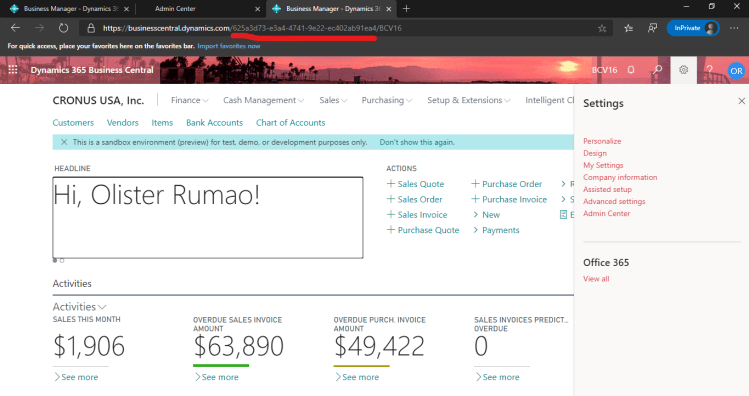
- Tenant ID – You can get this by going to Business Central with your browser and clicking on Help and Support. You will find your Tenant ID. If you don’t see it, you can always get it from your URL.
2.
 DIY Accountant